
Free · No sign-up · No font download
Instagram Font Generator
Create copy-and-paste Unicode text for Instagram bios, profile names and captions, with a built-in bio-length warning.
Instagram font styles
✓ Works on phone and desktop✓ No font install✓ Tap any style to copy
Instagram text basics
What Is an Instagram Font Generator?
An Instagram font generator maps ordinary text to alternative Unicode characters or adds Unicode decoration so you can copy the result into Instagram text fields. FontTex creates text rather than a downloadable font file or app preview. The Instagram preset focuses on styles suited to profile names, bios and captions, with a built-in bio-length warning.
Instagram fonts, sometimes shortened to IG fonts, are Unicode characters rather than a font file. Instagram itself still decides which characters a specific field accepts and how they render. FontTex helps you compare the text before copying it, but there is no separate Instagram font file being installed. For non-platform-specific styles, use the FontTex font generator.
| Compare | Styled Unicode text | Font file |
|---|---|---|
| Output | Copyable characters | TTF, OTF or another font format |
| Install needed | No | Usually yes |
| Typical use | Instagram profile names, bios, captions and other supported text fields | Design and document software |
Quick steps
How Do You Change Text Style for Instagram?
Type your text in FontTex, compare the Instagram preset, then copy the style you want and paste it into the target Instagram field. For bios, watch the built-in 150-character warning. After pasting, check the final field because names, bios and captions can handle Unicode differently.
01
Type your Instagram text
Enter a profile name, bio line or caption phrase. The preset updates live.
02
Compare readable options
Start with bold, script, bubble or small caps before moving to stronger frames or mild glitch.
03
Watch the bio warning
FontTex flags Instagram-preset styles over the 150-character bio warning threshold.
04
Copy, paste and check
Copy the result into Instagram, then confirm the exact field accepts the characters and still reads clearly.
Style guide
Which Instagram Font Styles Can You Try?
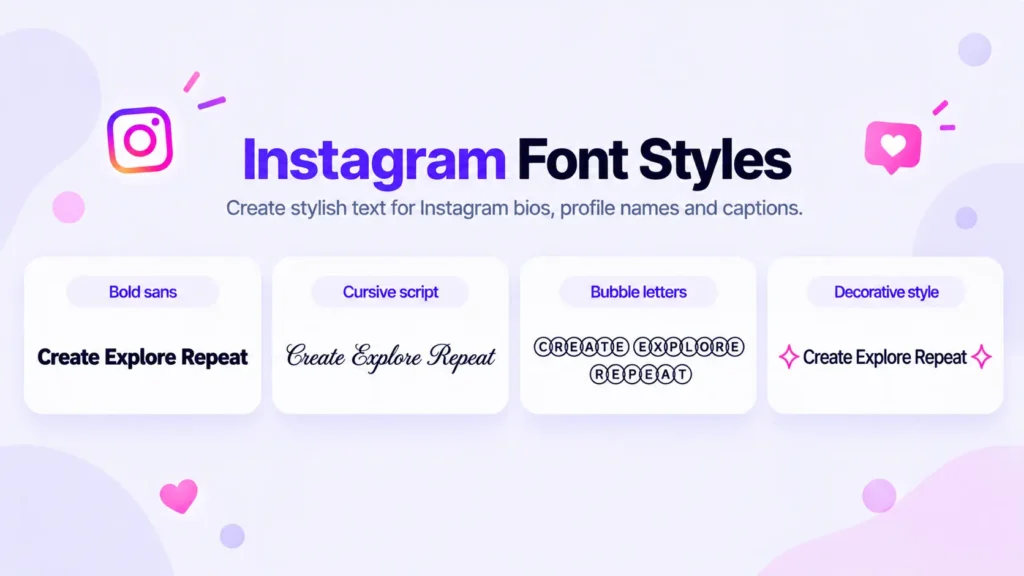
The Instagram preset mixes clean emphasis, script, bubble, gothic, block, compact, novelty and framed looks. Use the strongest decoration on short profile text. For longer captions, a clean bold or script result is usually easier to scan than a frame or glitch effect.
These examples come directly from the FontTex master export and stay inside the Instagram preset.
Bold Emphasis
𝗖𝗿𝗲𝗮𝘁𝗲 𝗘𝘅𝗽𝗹𝗼𝗿𝗲 𝗥𝗲𝗽𝗲𝗮𝘁
𝐂𝐫𝐞𝐚𝐭𝐞 𝐄𝐱𝐩𝐥𝐨𝐫𝐞 𝐑𝐞𝐩𝐞𝐚𝐭
Best for: Profile names, short hooks and caption accents that need clean visual weight.
Watch out: Bold text is easier to scan than most decorative styles, but full paragraphs can still feel heavy.
Script and Bubble
𝒞𝓇ℯ𝒶𝓉ℯ ℰ𝓍𝓅𝓁ℴ𝓇ℯ ℛℯ𝓅ℯ𝒶𝓉
ⒸⓇⒺⒶⓉⒺ ⒺⓍⓅⓁⓄⓇⒺ ⓇⒺⓅⒺⒶⓉ
Best for: Bio phrases and names that need a softer or more playful look.
Watch out: Script can become difficult at small sizes, while bubble letters take more horizontal room.
Gothic and Blocks
ℭ𝔯𝔢𝔞𝔱𝔢 𝔈𝔵𝔭𝔩𝔬𝔯𝔢 ℜ𝔢𝔭𝔢𝔞𝔱
🅲🆁🅴🅰🆃🅴 🅴🆇🅿🅻🅾🆁🅴 🆁🅴🅿🅴🅰🆃
Best for: Short names and edgy display text that needs a stronger silhouette.
Watch out: Gothic and filled square letters are best kept short so the word remains easy to recognize.
Compact Text
ᴄʀᴇᴀᴛᴇ ᴇxᴘʟᴏʀᴇ ʀᴇᴘᴇᴀᴛ
Best for: Short labels, highlights and profile text that benefits from a compact look.
Watch out: Small caps uses substitute Unicode characters, so the shapes can differ from ordinary capitals.
Upside Down, Lines and Mild Glitch
C̴r̵e̷a̓ţe̴ E̷x̓p̧l̴o̵r̷e̓ R̴e̵p̷e̓a̧t̴
ʇɐǝdǝɹ ǝɹoldxǝ ǝʇɐǝɹɔ
C̶r̶e̶a̶t̶e̶ E̶x̶p̶l̶o̶r̶e̶ R̶e̶p̶e̶a̶t̶
Best for: One short decorative accent when novelty matters more than fast scanning.
Watch out: Upside down, strikethrough and mild glitch can reduce readability or change spacing after pasting.
Frames and Decorators
♡ Create Explore Repeat ♡
✧ Create Explore Repeat ✧
【C】【r】【e】【a】【t】【e】 【E】【x】【p】【l】【o】【r】【e】 【R】【e】【p】【e】【a】【t】
꧁༺ Create Explore Repeat ༻꧂
Best for: Short profile names or bio phrases that need symbols around the text.
Watch out: Each-letter frames and gaming frames take more space. Check the bio warning and the exact destination field.
Pick by field
Which Instagram Field Are You Styling?
Match the style to the field rather than using the same treatment everywhere. A profile name needs fast recognition, a bio can carry one decorative line, and a caption usually benefits from a short styled hook followed by plain text. Test the final field because Instagram can handle Unicode differently across names, bios and captions.
Profile name
Prioritize recognition
Use bold, small caps or a light script when the name needs to stay easy to identify.
Try: 𝗖𝗿𝗲𝗮𝘁𝗲 𝗘𝘅𝗽𝗹𝗼𝗿𝗲 𝗥𝗲𝗽𝗲𝗮𝘁
Bio
Style one focal line
Use one short decorative phrase and keep contact details, links or instructions in plain text.
Try: ✧ Create Explore Repeat ✧
Caption
Use styled text as a hook
Style a brief opening phrase, then switch back to plain text for the rest of the caption.
Try: 𝐂𝐫𝐞𝐚𝐭𝐞 𝐄𝐱𝐩𝐥𝐨𝐫𝐞 𝐑𝐞𝐩𝐞𝐚𝐭
Copy and paste
Where Can You Use Instagram Styled Text?
Use the Instagram preset for profile names, bio lines and captions where the pasted characters are accepted. FontTex does not guarantee that every style will be valid in every Instagram field, so paste a short test first. If a name or bio rejects the result, choose a simpler style or plain letters.
Profile nameBioCaptionsCommentsShort phrases
Profile name
Keep it recognizable
Choose a clean or lightly styled result so people can still identify the account quickly.
Bio
Watch the warning
Use the 150-character bio warning as a practical check, then verify the final text in Instagram before saving.
Captions
Style the opening
A short styled hook can add emphasis without making a long caption harder to read.
Instagram compatibility note: Instagram can restrict Unicode differently by field. A character accepted in a caption may not be accepted in a profile name or other restricted field.
Fix common issues
Why Do Instagram Fonts Sometimes Fail After Pasting?
Instagram styled text is still Unicode text, so the destination field and viewing font control what happens after you paste it. If a result is rejected, becomes a box, looks different or makes the bio too long, use a simpler style and test the exact field again before saving.
The profile name rejects my text
That field may accept fewer Unicode characters than a caption or bio. Try bold, script, small caps or plain letters.
The bio warning appears
Shorten the text or choose a result with fewer added symbols. FontTex flags styles over the 150-character bio warning threshold.
A character becomes a box
The viewing app or device may not have a font that displays that character. Choose a simpler style or plain text.
The caption is hard to scan
Use styled text only on the opening phrase and keep the rest of the caption in plain characters.
My username will not accept styled text
Instagram may not accept styled characters in your username, even when your Name and bio accept them. If that happens, keep the username in plain letters and put the styled text in your Name or bio instead.
It looks different on iPhone and Android
Each phone draws Unicode characters with its own fonts, so a style can look slightly different on iPhone and Android, or show as a box on an older device. Check your profile on a second phone if you can.
Accessibility note: Decorative Unicode can be harder to read and may be announced unexpectedly by assistive technology. Keep contact information, instructions and other essential bio content in plain text.
FAQ
Instagram Font Generator FAQ
Quick answers about FontTex’s Instagram bio warning and the decorated styles in this preset.
Does FontTex’s 150-character warning apply to every Instagram field?
No. The 150-character warning in this tool is specifically for the Instagram bio. Other Instagram fields can apply different restrictions, so test the exact field before saving styled text.
Which Instagram styles add decoration around the text?
Heart frame, Sparkle frame, Gaming name frame and Each letter framed add visible decoration or framing. They can use more space than cleaner choices such as Bold sans or Small caps.

Created and reviewed by
Daniel Turner · Founder & Product Editor at FontTex
Daniel Turner oversees FontTex’s product direction, tool testing, and editorial content. He reviews guides about Unicode text transformations, copy-and-paste behavior, compatibility, readability, and accessibility, and checks technical claims against primary or authoritative sources where appropriate.
Make Your Instagram Text
Type a profile name, bio line or caption phrase, compare the preset, then copy the result that fits the field.