
Free · No sign-up · No font download
Cursive Font Generator
Type or paste your text to turn it into cursive you can copy and paste. Preview script, bold script, and decorative styles, then paste the one you like into a bio, caption, or message. No font download needed.
Cursive text styles
Cursive text, explained
What Is a Cursive Font Generator?
A cursive font generator turns normal typing into cursive fonts and script-style letters that you can copy and paste into bios, names, captions and messages. FontTex does this with Unicode characters, not a font file, so there is nothing to install. The text pastes into most apps that accept Unicode, but each app decides how it looks.
Real cursive handwriting uses connected letters that flow into each other with a slight slant. Unicode script letters copy that flowing, elegant look, but each letter is still a separate character. They sit side by side instead of truly joining. That is what lets them paste into a text box like normal words.
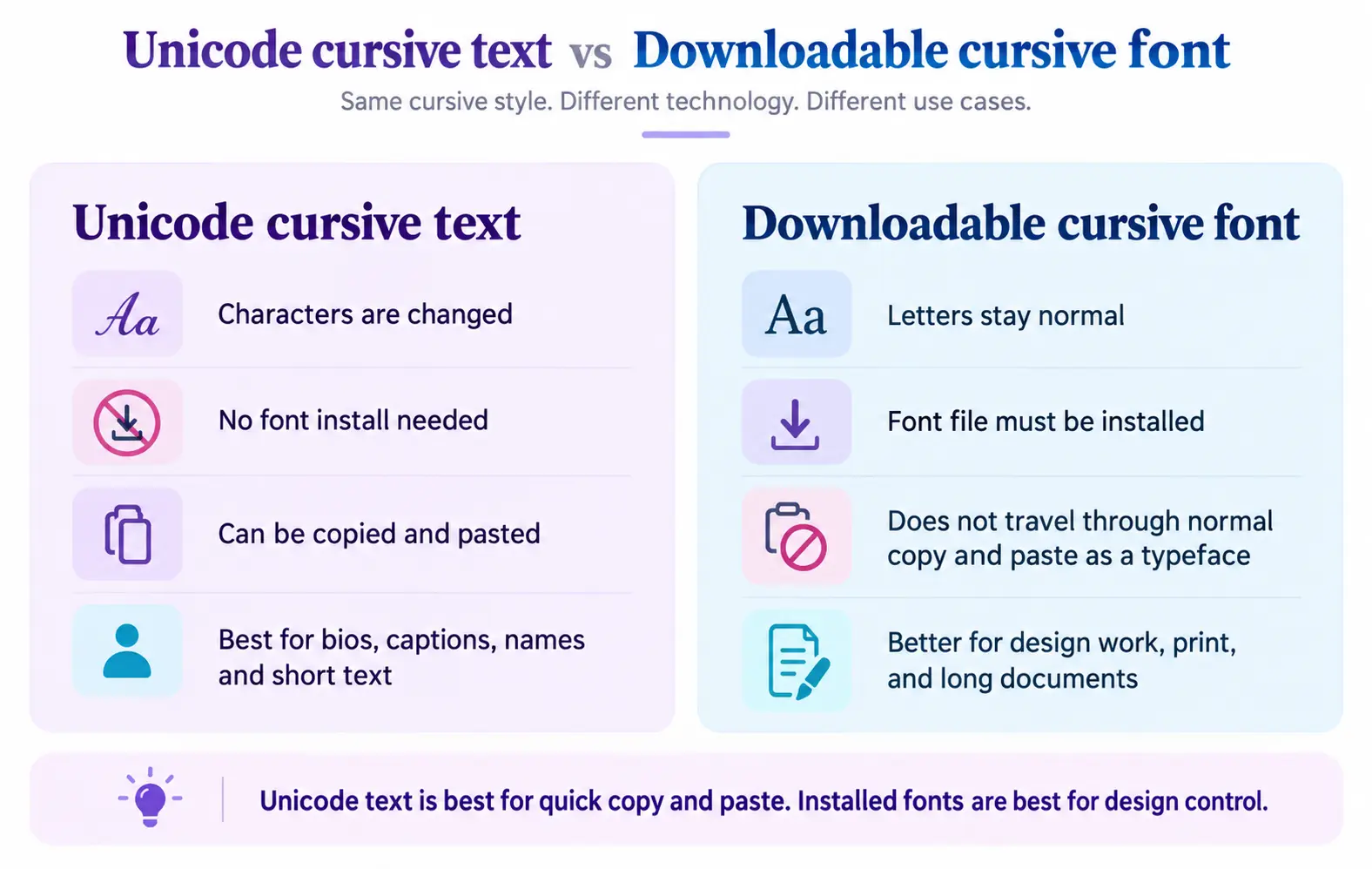
Need a cursive font to install for a logo, a poster or a printed wedding invitation? That is a different product. Here is how the two compare.
| Compare | Styled Unicode text | Downloadable font file |
|---|---|---|
| What you get | Letters you copy and paste as normal text | A TTF or OTF file you install on a computer |
| Where it works | Bios, display names, captions, comments and chats that accept Unicode | Design apps and documents that let you pick a font |
| Size and color | Set by the app you paste into | You choose them in your design app |
| Best for | Profiles, short posts and messages | Logos, branding, posters and printed invitations |
| Licensing | You paste characters, so no font file license is involved | Each font has its own personal or commercial use license |
How to use it
How to Use the Cursive Text Generator
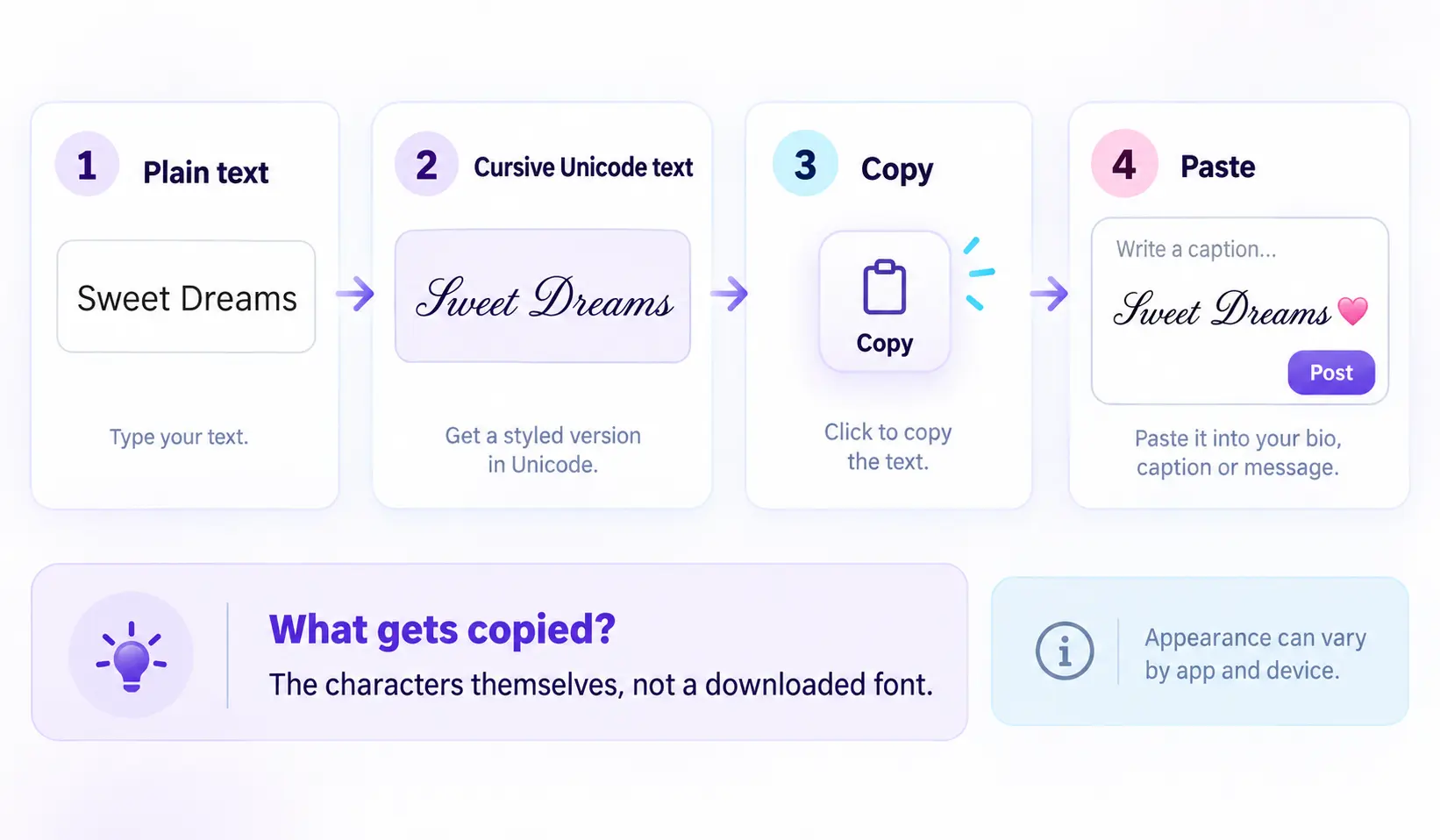
Type your words in the box above, pick a cursive style from the live preview, then tap it to copy. Paste the result into your bio, caption, name field or message. Every style updates as you type, so you can compare them all before you choose.
01
Type your text
Enter a name, a word or a short line in the box above. Your words turn into cursive as you type. Text you typed on another FontTex page carries over during your visit.
02
Compare the styles
Scroll the live preview or use Search styles to find one by name, like hearts or bold. Tap the star to keep a favorite in Saved. Recent helps you find styles you used lately.
03
Tap to copy
Tap any result or its Copy button. Want to compare options later? Export lets you copy all styles at once, download a TXT file, or print or save a PDF.
04
Paste it
Open your app and paste into the bio, caption, name field or chat. Check the preview before you save, since some fields change or block special characters.
Style guide
Cursive Styles and When to Use Each One
The styles above fall into six groups. Each group has places where it looks great and places where it can cause trouble. Every sample below shows the phrase “Moonlit Letters” so you can compare them side by side.
Classic cursive
Cursive script and Bold cursive
ℳℴℴ𝓃𝓁𝒾𝓉 ℒℯ𝓉𝓉ℯ𝓇𝓈
𝓜𝓸𝓸𝓷𝓵𝓲𝓽 𝓛𝓮𝓽𝓽𝓮𝓻𝓼
Best for: Names, short bios and a key word in a post. Bold cursive has thicker strokes, so it reads better on small phone screens.
Watch out: Long sentences get hard to read. Keep cursive to a few words.
Italic styles
Italic serif, Bold italic serif and Italic sans
𝑀𝑜𝑜𝑛𝑙𝑖𝑡 𝐿𝑒𝑡𝑡𝑒𝑟𝑠
𝑴𝒐𝒐𝒏𝒍𝒊𝒕 𝑳𝒆𝒕𝒕𝒆𝒓𝒔
𝘔𝘰𝘰𝘯𝘭𝘪𝘵 𝘓𝘦𝘵𝘵𝘦𝘳𝘴
Best for: Slanted emphasis in longer lines, quotes and captions. These read more like normal text.
Watch out: Italic letters slant but do not look handwritten, so they feel less fancy.
Vintage script
ᎷᎧᎧᏁᏝᎥᏖ ᏝᏋᏖᏖᏋᏒᏕ
Best for: A retro, hand-drawn look for a display name or a short tag.
Watch out: It borrows look-alike letters from other writing systems. Screen readers may read it as a foreign language, and search will not match it as your word.
Spaced cursive
Cursive spaced and Bold cursive spaced
ℳ ℴ ℴ 𝓃 𝓁 𝒾 𝓉 ℒ ℯ 𝓉 𝓉 ℯ 𝓇 𝓈
𝓜 𝓸 𝓸 𝓷 𝓵 𝓲 𝓽 𝓛 𝓮 𝓽 𝓽 𝓮 𝓻 𝓼
Best for: An airy, elegant look for one or two words, like a name at the top of a bio. Type a word above to preview it.
Watch out: The extra spaces use up a character limit faster.
Decorated cursive
Sparkles, hearts, stars, flowers, wings, moon, quotes and corner brackets, plus bold sparkles and bold hearts
✧ ℳℴℴ𝓃𝓁𝒾𝓉 ℒℯ𝓉𝓉ℯ𝓇𝓈 ✧
ʚ ℳℴℴ𝓃𝓁𝒾𝓉 ℒℯ𝓉𝓉ℯ𝓇𝓈 ɞ
♡ 𝓜𝓸𝓸𝓷𝓵𝓲𝓽 𝓛𝓮𝓽𝓽𝓮𝓻𝓼 ♡
♡ ℳℴℴ𝓃𝓁𝒾𝓉 ℒℯ𝓉𝓉ℯ𝓇𝓈 ♡
☆ ℳℴℴ𝓃𝓁𝒾𝓉 ℒℯ𝓉𝓉ℯ𝓇𝓈 ☆
✿ ℳℴℴ𝓃𝓁𝒾𝓉 ℒℯ𝓉𝓉ℯ𝓇𝓈 ✿
☾ ℳℴℴ𝓃𝓁𝒾𝓉 ℒℯ𝓉𝓉ℯ𝓇𝓈 ☽
“ℳℴℴ𝓃𝓁𝒾𝓉 ℒℯ𝓉𝓉ℯ𝓇𝓈”
「ℳℴℴ𝓃𝓁𝒾𝓉 ℒℯ𝓉𝓉ℯ𝓇𝓈」
✧ 𝓜𝓸𝓸𝓷𝓵𝓲𝓽 𝓛𝓮𝓽𝓽𝓮𝓻𝓼 ✧
Best for: Pretty, soft names and bio headers.
Watch out: Symbols can look different or show as boxes on older devices, and each one adds to your character count.
Want more hearts and sparkles? See cute fonts to copy and paste →
Underlined cursive
Cursive underline and Bold cursive underline
ℳ̲ℴ̲ℴ̲𝓃̲𝓁̲𝒾̲𝓉̲ ℒ̲ℯ̲𝓉̲𝓉̲ℯ̲𝓇̲𝓈̲
𝓜̲𝓸̲𝓸̲𝓷̲𝓵̲𝓲̲𝓽̲ 𝓛̲𝓮̲𝓽̲𝓽̲ℯ̲𝓻̲𝓼̲
Best for: Making one word stand out in a post or chat.
Watch out: A hidden underline mark follows every letter, so a 10-letter name uses 20 characters. Some apps place the line a little off.
Tips for Picking a Cursive Style
- Use cursive for a name or a short phrase, and keep the rest of your bio in plain text. It is easier to read.
- Try Bold cursive first on phones. Thick strokes hold up better at small sizes.
- Stick to one cursive style per line. Three styles in one sentence looks busy.
- For a soft, dreamy profile, pair a cursive name with fullwidth or spaced text from an aesthetic style.
How the letters work
Why Do Some Cursive Letters Look Different?
Some cursive letters look a little different because 11 of them come from an older Unicode block. The script letters B, E, F, H, I, L, M, R, e, g and o already existed, so the newer script alphabet reuses them. Fonts often draw the two blocks in slightly different sizes or weights. Bold cursive has no gaps, so it looks more even.
You can see this in the sample phrase: the ℯ characters in ℳℴℴ𝓃𝓁𝒾𝓉 ℒℯ𝓉𝓉ℯ𝓇𝓈 is one of those older letters. It is still a real script e, and it copies and pastes the same way as the others. Punctuation and emoji stay exactly as you typed them, since these Unicode blocks only replace letters.
English A to Z only
Unicode has script versions of the 26 English letters, in lowercase and capitals. Accented letters like é or ñ, and letters from other alphabets, have no script version, so they stay plain.
Numbers stay plain
Unicode has no cursive digits. Numbers, spaces and punctuation stay as normal text in every cursive style.
Size and color come from the app
The output is text, so you cannot set a size or color here. The app you paste into decides. Bold cursive is the heaviest option if you want more weight.
Cursive Alphabet to Copy
Tap to select a line, then copy the letters you need.
𝒶𝒷𝒸𝒹ℯ𝒻ℊ𝒽𝒾𝒿𝓀𝓁𝓂𝓃ℴ𝓅𝓆𝓇𝓈𝓉𝓊𝓋𝓌𝓍𝓎𝓏
𝒜ℬ𝒞𝒟ℰℱ𝒢ℋℐ𝒥𝒦ℒℳ𝒩𝒪𝒫𝒬ℛ𝒮𝒯𝒰𝒱𝒲𝒳𝒴𝒵
𝓪𝓫𝓬𝓭𝓮𝓯𝓰𝓱𝓲𝓳𝓴𝓵𝓶𝓷𝓸𝓹𝓺𝓻𝓼𝓽𝓾𝓿𝔀𝔁𝔂𝔃
𝓐𝓑𝓒𝓓𝓔𝓕𝓖𝓗𝓘𝓙𝓚𝓛𝓜𝓝𝓞𝓟𝓠𝓡𝓢𝓣𝓤𝓥𝓦𝓧𝓨𝓩
Cursive vs script vs italic
What Is the Difference Between Cursive, Script and Italic Text?
Cursive is joined, flowing handwriting. Script is a broader type style that imitates handwriting, joined or not. Italic is a slanted version of a normal typeface and does not look handwritten. Pick cursive or script for a personal, elegant feel, and italic when you want emphasis that still reads like normal text.
Cursive
Joined, flowing handwriting, like the writing taught in school. Letters connect in one stroke.
On FontTex: Cursive script and Bold cursive give the closest look.
Script
A wider type style that imitates handwriting or calligraphy. Script letters can be joined or separate.
On FontTex: all the cursive styles are script styles. Vintage script adds a retro twist.
Italic
A slanted version of a regular typeface. It adds emphasis but does not imitate handwriting.
On FontTex: Italic serif, Bold italic serif and Italic sans.
Where to use it
Where Can You Use Cursive Text?
You can paste cursive text into most places that accept Unicode, such as social bios, display names, captions, comments and chat messages. Results depend on the app and the device. Some name fields block special characters, and older phones may show boxes. Always check the preview before you save.
Instagram bioTikTok bioFacebook postsX postsDiscordText messagesComments
Bios and display names
A cursive name at the top of a bio stands out. Instagram bios allow 150 characters, and FontTex’s Instagram page warns you when a style goes over. Decorated and underlined styles use more characters than plain cursive.
Captions, posts and chats
Use cursive for one line or a key word, like a quote, a title or a sign-off. A whole caption in cursive is hard to read, and screen readers may struggle with it.
Digital cards and invites
Cursive text looks lovely in a text message, a group chat or a digital card for a wedding, birthday or holiday. For printed invitations, logos or branding, use a real script font in your design app.
Not for website headings or documents. If you run a website or write in Word or Google Docs, choose a cursive font from the font menu instead of pasting Unicode letters. Search, spell check and screen readers may not read pasted script letters as normal words.
Troubleshooting
Cursive Text Not Working? Try These Fixes
Most problems come from the app you paste into, not from the text itself. Open the issue that matches what you see.
I see boxes or question marks
The device or app is missing a font that can draw these characters. Try a different style, update the app, or check on another device. The letters are still there; only the display is missing.
The app changed it back to normal letters
Some apps clean up special characters in certain fields. Paste into a different field, such as your bio instead of your username, or try another style.
My username field will not accept it
Many sites allow only plain letters, numbers and a few symbols in usernames. Put the cursive version in your display name or bio instead.
The underline sits in the wrong spot
The underline is a separate mark placed after each letter, and some fonts position it poorly. Switch to Cursive script or Bold cursive without the underline.
It looks different on my friend’s phone
Each device draws Unicode letters with its own fonts, so shape, size and spacing can change a little. This is normal and cannot be fixed from the sender’s side.
It went over the character limit
Spaced, decorated and underlined styles add extra characters. Switch to plain Cursive script or shorten the text.
Accessibility note. Screen readers may read cursive letters by their long Unicode names or skip them. Vintage script uses letters from other writing systems and may be read as a foreign language. Keep important details, like contact info or links, in plain text.
FAQ
Cursive Font Generator FAQ
Can I type capital letters in cursive?
Yes. Type capital letters and the cursive styles convert them too. A capital first letter with lowercase cursive after it usually reads best for names.
Can I make just one cursive letter or a short name?
Yes. Type a single letter or a short name and every style updates the same way it does for a full sentence. Short text is where cursive styles read best.
Can I use this to preview a tattoo or a signature?
You can type a name to get a quick feel for how it looks in script. For a tattoo or a signature, work with a real font or a hand-drawn design, because these letters have fixed shapes and change from device to device.

Created and reviewed by
Daniel Turner · Founder & Product Editor at FontTex
Daniel Turner oversees FontTex’s product direction, tool testing, and editorial content. He reviews guides about Unicode text transformations, copy-and-paste behavior, compatibility, readability, and accessibility, and checks technical claims against primary or authoritative sources where appropriate.
Write Your Name in Cursive
Scroll up, type a name and tap a style to copy. Want more than cursive? Try 110+ styles in the FontTex font generator or browse FontTex style families.