
Free · No sign-up · No font download
Cute Font Generator
Create cute fonts to copy and paste: bubble letters, soft script and heart, star or moon frames for bios, names and captions.
Cute font styles
✓ Works on phone and desktop✓ No font install✓ Tap any style to copy
Cute text basics
What Are Cute Fonts?
Cute fonts are playful Unicode text styles you can copy and paste, such as bubble letters, soft script and heart or sparkle frames. FontTex gives you copyable characters rather than a downloadable font file, so you can preview rounded, script and framed looks and paste a result into any field that accepts those characters.
Cute text is a mood rather than one alphabet, and people also call it pretty or kawaii text. The preset focuses on bubbles, rounded looks, script, hearts, sparkles, stars, flowers, moons and other playful frames. If you want softer spacing-led or broader aesthetic styles, use the dedicated Aesthetic page instead of stretching this page beyond its cute/decorated intent. You can also browse the full FontTex catalogue.
| Compare | Styled Unicode text | Font file |
|---|---|---|
| Output | Copyable characters | TTF, OTF or another font format |
| Install needed | No | Usually yes |
| Typical use | Bios, names, captions, messages and short decorative text | Design and document software |
Quick steps
How Do You Make Cute Text?
Type or paste your text into the generator, compare the Cute results, then copy the look that matches the mood you want. Paste it into the real destination and check both readability and fit. A short name can carry more decoration than a long bio, so use the strongest frames on the shortest text.
01
Type your text
Enter a name, phrase, caption or short message. The Cute results update from the same input.
02
Compare the mood
Look at rounded, script, heart, sparkle, star and frame directions rather than choosing only by how busy they look.
03
Copy a favorite
Tap the result you want to copy. Saved and Recent can help you return to a style on the same browser and device.
04
Paste and check
Paste into the target field. If the result feels crowded or a character is rejected, choose a simpler cute style.
Style guide
Which Cute Styles Can You Try?
The Cute preset ranges from simple bubbles and script to heavily decorated frames. For longer text, start with a lighter treatment. For a short display name or one-word accent, a heart, sparkle, moon or gaming frame can add more personality without styling every line.
The examples below come directly from the FontTex master export and use only styles included in the Cute preset.
Bubbles and Rounded Text
ⓈⓌⒺⒺⓉ ⒹⓇⒺⒶⓂⓈ
ᔕᗯEET ᗪᖇEᗩᗰᔕ
🅢🅦🅔🅔🅣 🅓🅡🅔🅐🅜🅢
Best for: Playful labels, short names and simple cute accents.
Watch out: Baby rounded uses look-alike symbols from another writing system and may be read unexpectedly by assistive technology.
Script and Compact Text
𝒮𝓌ℯℯ𝓉 𝒟𝓇ℯ𝒶𝓂𝓈
ꜱᴡᴇᴇᴛ ᴅʀᴇᴀᴍꜱ
𝓢𝔀𝓮𝓮𝓽 𝓓𝓻𝓮𝓪𝓶𝓼
Best for: Short bios, names and gentle profile accents.
Watch out: Thin script can be harder to scan at small sizes. Small caps is cleaner but less decorative.
Soft and Heart Frames
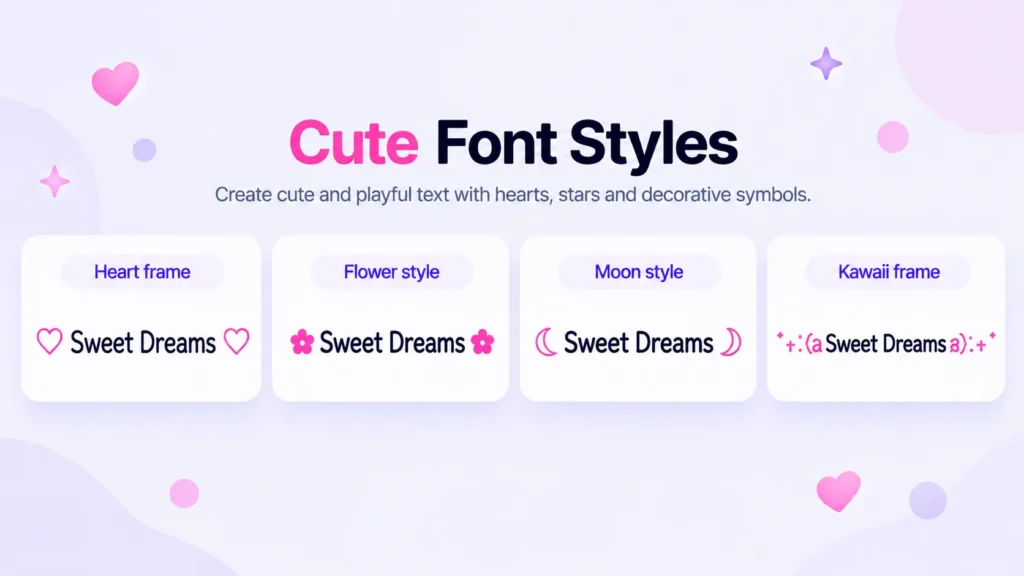
˚₊‧꒰ა Sweet Dreams ໒꒱‧₊˚
♡ Sweet Dreams ♡
S ♡ w ♡ e ♡ e ♡ t ♡ ♡ D ♡ r ♡ e ♡ a ♡ m ♡ s
Best for: A soft bio line, display name or affectionate phrase.
Watch out: Heart frame and heart-spaced text use extra width, so check narrow fields before saving.
Sparkles and Stars
✧ Sweet Dreams ✧
☆ Sweet Dreams ☆
S ✧ w ✧ e ✧ e ✧ t ✧ ✧ D ✧ r ✧ e ✧ a ✧ m ✧ s
Best for: Short celebratory or playful phrases that need a light decorative edge.
Watch out: Sparkle and star treatments can become noisy when every line uses them.
Flowers, Wings and Night
☾ Sweet Dreams ☽
✿ Sweet Dreams ✿
ʚ Sweet Dreams ɞ
★彡 Sweet Dreams 彡★
♛ Sweet Dreams ♛
Best for: One-word names, themed bios and short decorative headings.
Watch out: Flower, wing, moon, galaxy and crown frames work best when the plain meaning is already easy to recognize.
High-Impact Cute Frames
◇S◇◇w◇◇e◇◇e◇◇t◇ ◇D◇◇r◇◇e◇◇a◇◇m◇◇s◇
꧁༺ Sweet Dreams ༻꧂
Best for: Very short names or labels where each character can carry more decoration.
Watch out: Each-letter diamonds and gaming name frames take more room and are poor choices for long text.
Pick the mood
How Should You Pick a Cute Style?
Match the amount of decoration to the job. A bubble or script result is easier to reuse across a name and short bio, while a heart, sparkle or moon frame is better for one focal phrase. Keep the most important words readable and let the decoration support the message instead of competing with it.
Soft
Keep the look gentle
Use script, bubbles or a soft frame when you want a cute effect without heavy decoration.
Try: 𝒮𝓌ℯℯ𝓉 𝒟𝓇ℯ𝒶𝓂𝓈
Playful
Add one strong accent
Stars, sparkles, hearts and flowers work well around one short name or phrase.
Try: ☆ Sweet Dreams ☆
Compact
Watch the width
Each-letter frames and gaming-style borders can look fun, but test them in narrow name and bio fields.
Try: ꧁༺ Sweet Dreams ༻꧂
Copy and paste
Where Can You Use Cute Text?
Cute Unicode text can be tried in bios, display names, captions, messages and other text fields that accept the copied characters. App and field rules vary, so test the exact destination. A style that is accepted in a caption may still be rejected in a username or other restricted field.
InstagramTikTokDiscordFacebookBiosMessages
Bios
Style one short line
Use a cute phrase or name as an accent while keeping important details easy to read.
Try: ˚₊‧꒰ა Sweet Dreams ໒꒱‧₊˚
Display names
Keep it recognizable
Choose a rounded or light decorative style when people need to identify the name quickly.
Try: ꜱᴡᴇᴇᴛ ᴅʀᴇᴀᴍꜱ
Captions
Decorate the hook
Use one cute phrase near the start, then switch back to plain text for longer copy.
Try: ♡ Sweet Dreams ♡
Compatibility note: Cute text is still Unicode text, and each app or field can handle those characters differently. Test the exact field before relying on a decorated result.
Fix common issues
Why Can Cute Text Look Different After Pasting?
Cute Unicode text can change in appearance because the destination chooses the font used to draw the copied characters. If you see boxes, missing symbols, unexpected spacing or a rejected result, switch to a simpler style and test again. Dense frames and look-alike letters need the most care.
A symbol becomes a box
The viewing app or device may not have a glyph for that symbol. Try a lighter frame or plain text.
The name field rejects the result
That field may accept fewer Unicode characters than a caption or bio. Try a simpler style or ordinary letters.
The decoration is too wide
Frames and spaced styles can take more horizontal room than plain text. Shorten the phrase or choose a less decorated option.
A rounded style sounds wrong in a screen reader
Baby rounded uses look-alike symbols from another writing system. Use plain text for important information and a simpler decorative style when accessibility matters.
Accessibility note: Cute decoration can reduce readability when it surrounds every word. Baby rounded also uses look-alike symbols that screen readers may pronounce unexpectedly. Keep instructions, contact details and other essential information in plain text.

Created and reviewed by
Daniel Turner · Founder & Product Editor at FontTex
Daniel Turner oversees FontTex’s product direction, tool testing, and editorial content. He reviews guides about Unicode text transformations, copy-and-paste behavior, compatibility, readability, and accessibility, and checks technical claims against primary or authoritative sources where appropriate.
Make Your Cute Text
Type your text, compare the Cute preset, then copy the playful result that fits your space. You can also browse more FontTex style families.